Recovering Deleted Git History: Restoring a Removed Commit to Reveal Sensitive Data
What Happens
This challenge demonstrates practical digital forensics by leveraging Git history to recover intentionally deleted information. After inspecting the commit logs, a prior revision was identified as the point where sensitive data originally existed. By checking out that specific commit, the hidden flag was successfully restored — mirroring real-world techniques used in incident response and source code audits.
What I Did

after download the file, there is only 1 file inside folder

and when opened it shows TOP SECRET

because this is GIT challenge, I tried to check the changes log using git log on terminal
git log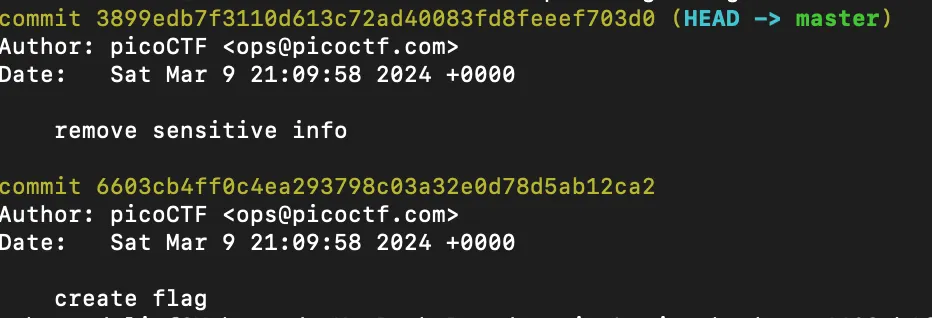
turns out there is a commit where the flag is created before new commit for removing the flag, now I just need to go into that commit using checkout on terminal.
git checkout 6603cb4ff0c4ea293798c03a32e0d78d5ab12ca2then after switching to that commit I just need to open the file again to get the flag
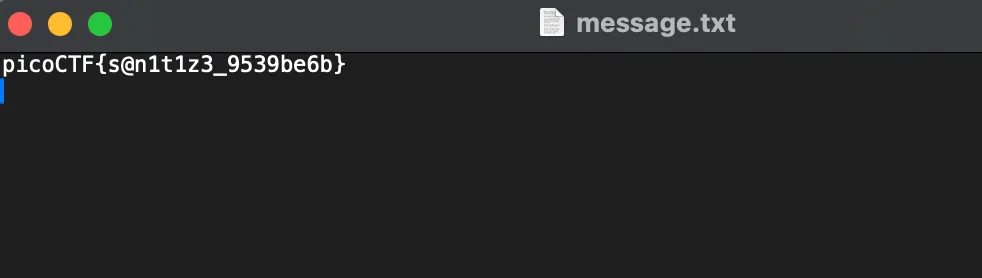
and the flag is shown
picoCTF{s@n1t1z3_9539be6b}